Support
-
-
Software Name:
PTZ IP Camera CD
-
Software Size:
-
Software Description:
This software CD for P01XXX and P02XXX
-
Download:
-
-
-
Software Name:
4G router firmware upgared
-
Software Size:
-
Software Description:
Download the firmware zip file package. It contains 4G router firmware upgrade and upgrade instructions.
-
Download:
-
-
P03Z35LW4T20_V1.0.9_20210320_EN.bin
-
Software Name:
P03Z35LW4T20_V1.0.9_20210320_EN.bin
-
Software Size:
-
Software Description:
1,Fixed the compatibility issue of the camera to the SD card
2. Fixed the problem that the audio output volume size adjustment is invalid
3. Fix the problem that the activation code causes the image mode to change
4,Fixed an issue where human recognition was invalid after the upgrade -
Download:
-
-
How to setting auto Tracking for PTZ ip camera
-
Software Name:
How to setting auto Tracking for PTZ ip camera
-
Software Size:
-
Software Description:
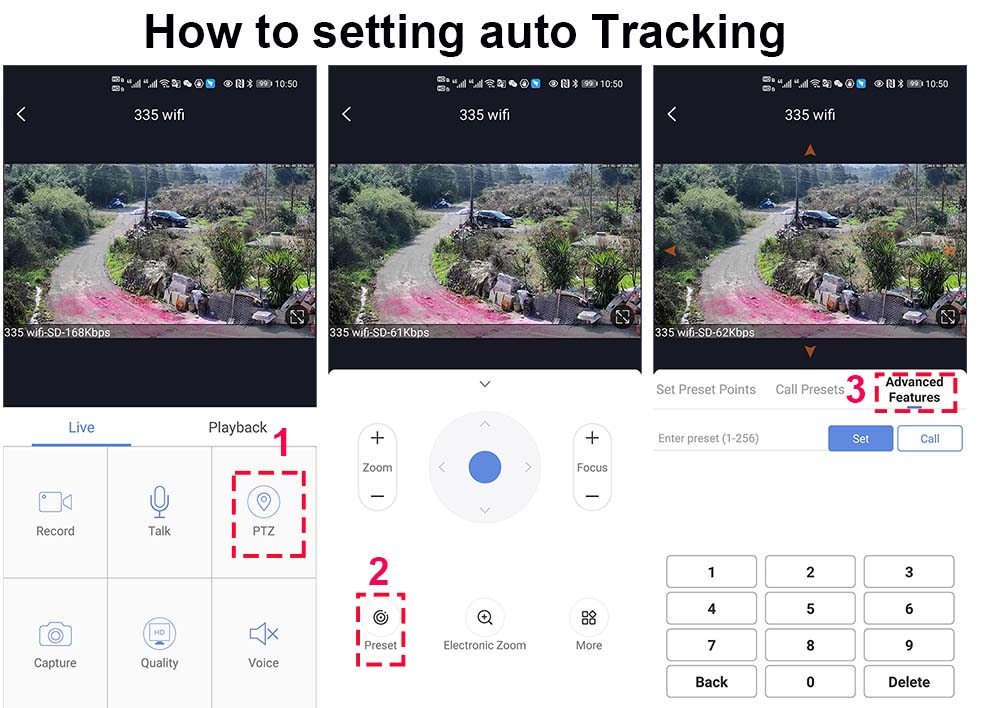
Camera tracking is divided into 2 modes:
1,Fixed-point tracking: fixed-point tracking based on a return position. Return to the return position and wait for the next tracking when the tracking over.
>Before turn on the track function, you need to set the return position (Home position) after the end of the tracking.
Then turn on tracking. In the case of no tracking action, the camera is waiting at the return position, The camera is turned on when the human is detected. After tracking is completed, the camera automatically returns to the return position and continues to wait for the next tracking.We define the return position as preset 88thSetting method: Rotate the camera to the position you want, then enter 88 on the keyboard,
and click "Set" to complete the setting of the return position (88+Set)Enter 97 and click “Call” ,the camera will Trun on tracking , Setting method: [97]+[Call];
Cruise tracking: Based on the cruise tracking between some preset positions(Max support 32 positions), When human is found in cruising, the camera automatically Turn on human tracking. When the human disappears, it automatically enters the next position to continue cruising.
Setting method: Rotate the camera to the position you want, then enter 1 on the keyboard, and click “Set” The 1th preset position is set successfully. By analogy, you can set up to 32 positions
Set 1,2,3,4….max 32 preset positions,Then enter 98 and click “Call” the camera will auto turn on cruise tracking
Setting method: [98]+[Call] for turn on cruise trackingHow to Turn OFF Tracking
enter 96 and click “Set” ,the camera will Trun OFF tracking
Setting method: [96]+[Set]Note: The camera will automatically resume tracking after 5 minutes when manually controlling the camera,And this waiting time can be modified. Please refer to the manual for details
-
Download:
-
-
P03Z91LW4-355 Software and manual download
-
Software Name:
P03Z91LW4-355 Software and manual download
-
Software Size:
-
Software Description:
New ptz ip camera P03Z91LW4-355
-
Download:
-
-
Firmware_H8SX-50PSD_V2.1.0_20260915_CN_V001.bin
-
Software Name:
Firmware_H8SX-50PSD_V2.1.0_20260915_CN_V001.bin
-
Software Size:
-
Software Description:
Update_H8SX-50PSD_V2.1.0_20260915_CN_V001.bin
Function update:
1. Support switching from passenger flow statistics to head shoulder algorithm model;
2. Support headcount function, remove departure detection function;
3. Wired bolt supports digital zoom and tracking amplification functions;
4. Support timed capture function;
5. Add a prompt on the RTMP page of the web to indicate that AAC is fixed
6. Support P6SCMS protocol;
7. Optimize the convergence speed of the image after turning on and off the lights;
8. Support default alarm input capability, regardless of whether it is connected to the tailboard or not;
9. Support modifying preset position names on the browser;
10. Supports HTTPS/RTSPS;
11. Support advanced pan tilt trajectory timing function;
12. Optimize HTTPS login and page switching speed, compare with Dahua;
13. Support password security;
14. Support mandatory password change customization;
15. Optimization of synchronization device startup speed;
16. When adding sound waves for the first time under the WIFI tailboard;
17. Support device event logging;
18. Solve the problem of color noise when switching from color to black and white
19. Solve the problem of collapse when switching between passenger flow and number statistics;
20. Non polarized infrared mode supports preset point switch lights;
21. Optimize the light absorption effect of human figures in the no overexposure mode of the face,
-
Download:
-
-
-
Software Name:
HiEasy NVR 5.0 Manual
-
Software Size:
-
Software Description:
-
Download:
-
-
P35H8SXP2AS-Q1-30-EN for 30x zoom
-
Software Name:
P35H8SXP2AS-Q1-30-EN for 30x zoom
-
Software Size:
-
Software Description:
P35H8SXP2AS-Q1-30-EN.bin
-
Download:
-
-
MS338Q_V22.11.26.16.65-20251203(4K.b042.38).zip
-
Software Name:
MS338Q_V22.11.26.16.65-20251203(4K.b042.38).zip
-
Software Size:
-
Software Description:
MS338Q_V22.11.26.16.65-20251203(4K.b042.38).zip
-
Download:
-
-
Firmware_H8SX-50PSD_V2.0.0_20260401EN (2).bin
-
Software Name:
Firmware_H8SX-50PSD_V2.0.0_20260401EN (2).bin
-
Software Size:
-
Software Description:
Firmware_H8SX-50PSD_V2.0.0_20260401EN (2).bin
-
Download:
-
-
-
Software Name:
P35H8SXWP2AS-Q1.Bin
-
Software Size:
-
Software Description:
P35-HiEasy.zip
-
Download:
-
-
MS338Q_V22.1.30.16.65-20251222(4K.b042.38.4G).zip
-
Software Name:
MS338Q_V22.1.30.16.65-20251222(4K.b042.38.4G).zip
-
Software Size:
-
Software Description:
MS338Q_V22.1.30.16.65-20251222(4K.b042.38.4G).zip
-
Download:
-